A board of your servers
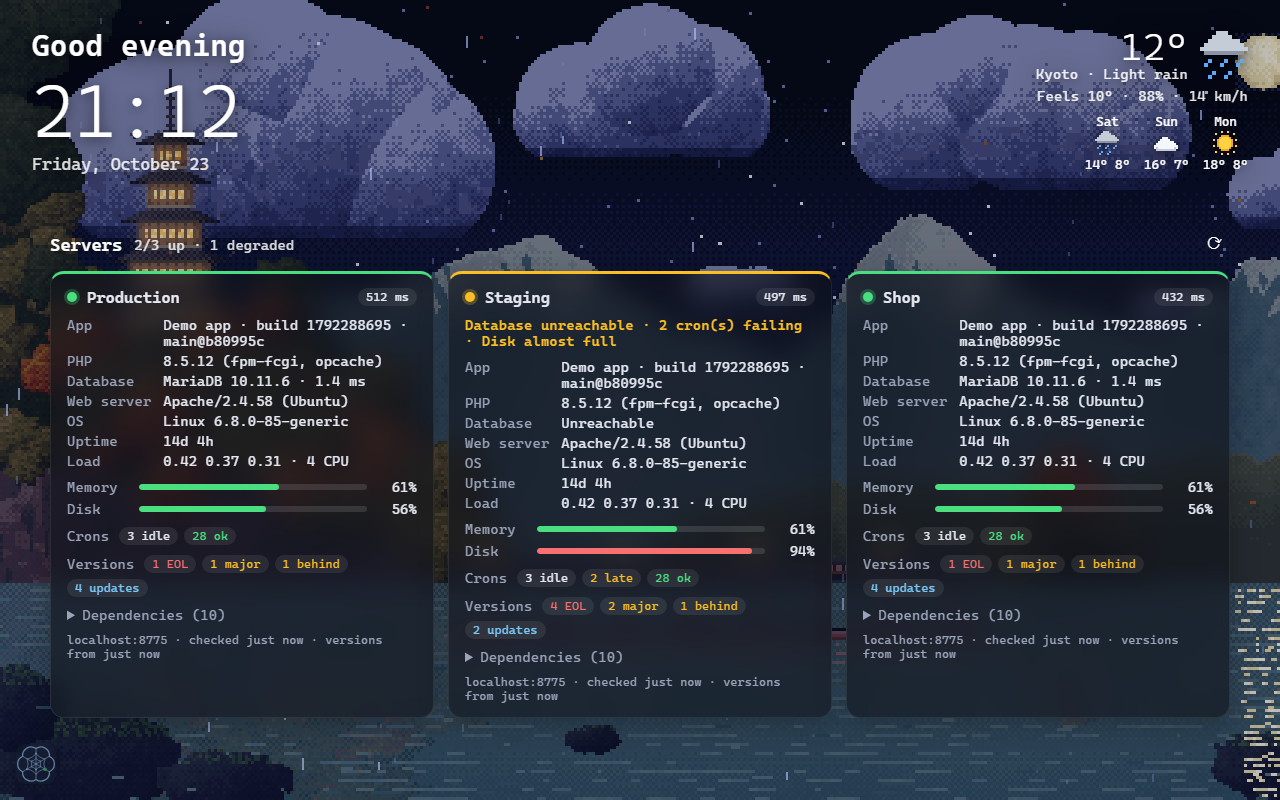
Each server is a card: up, degraded or down, response time, memory and disk bars, database, crons, uptime and load. Checked every minute while the tab is open.
Kumo Tabs replaces the new tab page of Chrome and Firefox with a living pixel-art scene, a clock and the weather, plus a live health board of your web servers: proof of life, latency, crons and tool versions.
See what it does ↓This banner is the real new tab. Try it:
Servers 2/3 up · 1 degraded
28 ok3 idle4 updates
2 crons late · disk almost full
26 ok2 late1 EOL2 major
12 okversions ✓
What it does
Each server is a card: up, degraded or down, response time, memory and disk bars, database, crons, uptime and load. Checked every minute while the tab is open.
A five-tier pagoda over a lake, or Mount Fuji, painted pixel by pixel in four seasons, by day and by night, with ripples, stars, lanterns and passing birds.
Rain, snow or sun on the scene follow the actual weather of your city (Open-Meteo, no API key), with a weather widget and a 5-day forecast.
PHP, Node.js, MariaDB, nginx, npm and Packagist packages are compared with their releases: end of life, new LTS, majors and patches at a glance.
No account, no tracking. Tokens and settings stay in the browser; servers only store a SHA-256 hash and answer one GET request.
Greeting, clock, search, weather and the board can sit anywhere. Themes, accent, fonts, cards, your own photos as a slideshow.
Your own pictures
Pick Background → Uploaded images (slideshow) and press Add pictures: add as many as you like at once. Every new tab opens on a random one, then crossfades to another, with the weather and the server board on top.
Drop a few of your photos here
They play as a slideshow in the banner above, with the weather on top. Nothing is uploaded.
Screenshots



How it works
GET /vitals with a small JSON report, from PHP, Node.js, Python, Go… Copy one of the ready-made examples.{
"ok": true,
"app": { "name": "My app", "build": 1792288695 },
"db": { "ok": true, "version": "10.11.6-MariaDB", "latencyMs": 1.4 },
"server": { "uptime": 1224600, "load": [0.42, 0.37, 0.31], "cpus": 4 },
"dependencies": [{ "name": "Node.js", "group": "runtime", "version": "24.12.0" }]
}
Free on the Chrome Web Store (also for Edge, Brave and Opera) and on Firefox Add-ons.